NPR Tree Workflow
1. Basic Concept
NPR Tree is a second shading graph attached to a regular object material. It is used to reorganize and stylize Eevee material results in an NPR-oriented way.
The regular object material still handles the base surface shading, while the NPR Tree adds an extra NPR presentation layer on top.
2. How to Attach It
- Keep the normal
Material Outputand base shading in the regular object material. - Select the
Material Outputnode. - Create or assign a node group in its
NPR Treeproperty.
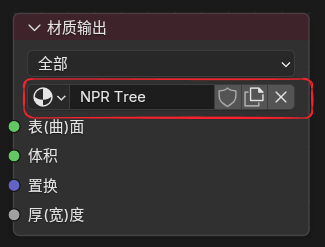
- To edit this tree, switch the Shader Editor top
Shader TypetoNPR.
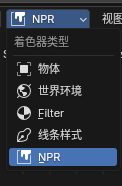
3. Notes
- The material render mode needs to be set to
Dithered (Deferred) Ctrl + Tabcan be used to switch quickly between the regular object material and the NPR treeNPR Treekeyframes and drivers use a dedicatedNPR Tree Action, which can be viewed, switched, or created inMaterial Properties > Animation > NPR Tree Action

4. Main NPR Nodes
In addition to the dedicated NPR nodes below, Curvature, Raycast, GLSL Function, and GLSL Script Expression can also be used directly inside NPR Tree.
NPR Input
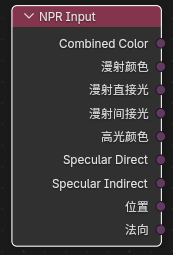
Purpose
Reads the input buffers provided by the NPR rendering stage.
Outputs
Combined ColorDiffuse ColorDiffuse DirectDiffuse IndirectSpecular ColorSpecular DirectSpecular IndirectPositionNormal
These outputs are closer to image / texture handles than ordinary scalar values, so they are typically passed to Image Sample or other NPR-aware nodes for further processing.
NPR Refraction
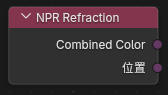
Purpose
Reads refraction-related buffers, similar in spirit to Screenspace Info.
Outputs
Combined ColorPosition
Image Sample
Entry
Add > Utilities > Image Sample
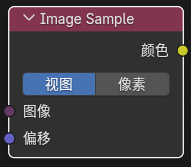
Inputs / Outputs
- Inputs:
Image,Offset - Output:
Color
Purpose
Samples image-style handles such as those coming from NPR Input or NPR Refraction.
Offset Modes
View: offset in view spacePixel: offset in pixel space
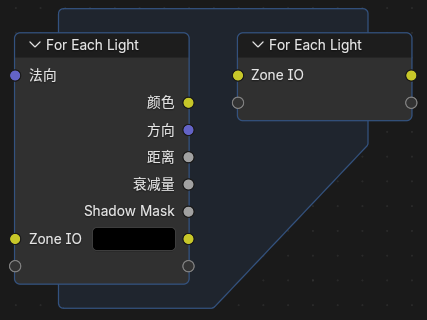
For Each Light
Entry
Add > Utilities > For Each Light
Notes
This node runs its internal logic once for every light affecting the current surface and outputs per-light information during each iteration.
Built-In Data
For Each Light Input currently provides:
- Input:
Normal - Outputs:
Color,Direction,Distance,Attenuation,Shadow Mask
It also supports custom area input / output sockets so intermediate values can be passed through the per-light loop.
5. Built-In NPR Node Group Assets
This version ports a group of commonly used node groups from the Blender 4.4 NPR branch and repackages them as Blender 5.2.0 LTS-compatible assets.
Main Built-In Assets
CavityCo-Planar Edge DetectionCurvatureKuwaharaShading ModelsSurface Curvature
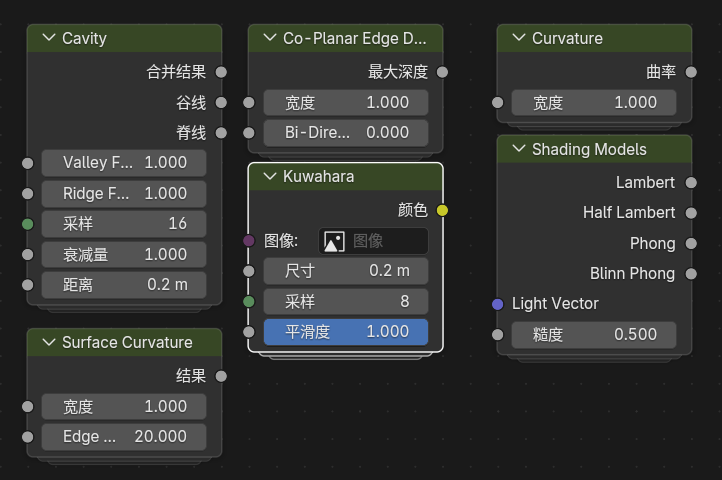
Main NPR node groups migrated to Blender 5.2.0 LTS
Asset Notes
- These node groups have been migrated to the Blender 5.2.0 LTS format
- Because repeat-zone node names changed, old Blender 4.4 NPR Prototype files may need to reconnect region-related nodes manually
Eevee Only
NPR Tree currently supports only Eevee, not Cycles.